Posts

Folder properties hidden checkbox greyed out.

Image
All of a sudden some of the users complained that they are unable to see some folders in the share drive. When I check  the server, those affected folders carried the attribute "HS" meaning hidden and system file while the other folders doesn't have any attributes. I am not very sure about the cause but to resolve the issue, I ran ATTRIB -S -H "Folder Location" /S /D and things came back to normal.

A general system error occurred: The system returned an error. Communication with the virtual machine may have been interrupted

Image
I was unable to Power On a virtual system through my Virtual Center. After searching for a while I found a link  stating that restarting the management service of the ESXI will solve the issue and it did. Manually ssh into the specific ESXI server that holds the problematic virtual system and ran the command  service mgmt-vmware restart Once the management service has been restarted, I tried to power on the Virtual System but at 95% it keeps continuously doing " Update Child Resource Configuration ". Let it be. After giving it some time, I could finally power on the virtual system.

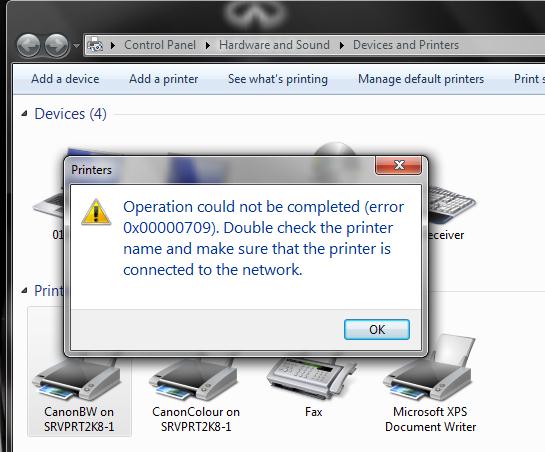
Operation could not be completed (error 0x00000709)

Image
We just had an upgrade of the printer infrastructure. New printers are installed, Canon Uniflow software are being upgraded as well as the existing drivers are being upgraded. Things went fine except for few users having issues like: Cannot set default printer Cannot print directly from Outlook client Thanks to the link  http://www.howtogeek.com/forum/topic/can-not-set-any-printer-as-default-printer  the issues were resolved following the steps there. The fix, which worked for me yesterday, is simple: Go to HKCU\Software\Microsoft\Windows NT\CurrentVersion\Windows\ -If the Windows key doesn't exist, create a new key; Then check for the following entry (or create it if it is not there) Name: Device Type: Reg_SZ (String Value) Value: winspool,Ne00 Should you be unable to save it, just make sure the user has Full (or special) access to the Windows key (by right-clicking on the key) After that I ran the "gpupdate /force" as the drivers were pushed using gr...

Plone Active Directory Authentication

Image
I will be using the same system from my earlier Plone Installation post to continue with the Active Directory authentication. python-ldap and plone.app.ldap are required to be installed for this purpose. Installation of python-ldap took me quite sometime with errors like [Error: Couldn't install: python-ldap 2.4.10] as shown in the figure below: To properly install python-ldap, development libraries are required to be installed. So, for my Fedora System, i install the following libraries as shown below: yum install python-ldap python-devel openldap openldap-devel cyrus-sasl-devel To install the python-ldap, add the entries in the buildout.cfg as shown below: eggs = ….. plone.app.ldap zcml = …... plone.app.ldap After building the buildout ( ./bin/buildout ), start the plone ( ./bin/plonectl start ) Login to the site as admin and start the Zope Management Interface and click the " acl_users " as shown below: Selec...

Cannot resolve SID in Windows Server 2008

Image
While performing file permissions in Windows Server, sometimes one may notice that the SID of the users are not resolve properly especially between child domain and parent domain. To resolve this issue, local policy of the affected system needs to be changed as shown below. Open up the local group policy editor by running the command gpedit.msc on the windows server and navigate through Computer Configuration > Security Settings > Local Policies > Security Options and disable the three components Domain Member: Digitally encrypt or sign secure channel data (always) Domain member: Digitally encrypt secure channel data (when possible) Domain member: Digitally sign secure channel data (when possible)  Restart the Server to refresh the policy settings. This resoved my issue.

Plone Installation with Apache SSL Redirection

Image
A fresh installation of Fedora 17 is taken. To get most of the dependencies installed in a easier way, a group install of Development Tools is performed with root permission. yum -y groupinstall "Development Tools" After some trial and error of missing dependencies while installing Plone and it's add-ons, the following are also installed to simplify Plone installation at the later stage yum -y install zlib-devel openssl-devel libjpeg-devel mod_ssl httpd Download the latest plone from  http://plone.org/ . untar it and install the plone as root. installation will take sometime to complete. If any error thorws up, read carefully and install the missing plugins. ./install.sh standalone Once the installation is complete, read the README.html under /usr/local/Plone/zinstance/README.html Start the Plone by running ./bin/plonectl start from within the directory /usr/local/Plone/zinstance/ Open up a browser and navigate to the site http://localhost:8080 to ch...

Shared Mailbox Issue - You do not have the required permissions to send messages from this mailbox. (Outlook Web Access)

Image
Certain times, I get calls from staff saying that they are unable to send out emails from their shared mailboxes using the outlook web access (OWA) but they are able to do so using their outlook client. I didn’t have any issue with both the OWA and Outlook client while using my shared account. This must be because I am a member of the Domain Admin Group. To solve this issue for general staff/user, you need to add the appropriate permissions in the EMC. 1.        Go to EMC and right click on the shared mailbox and click properties as shown in the figure below. 2.        Click on “Mail Flow Settings” tab, select “Delivery options” and click “Properties” 3.        In the “Grant this permission to” section, click “Add” and add the user. He will be able to send emails from the shared mailbox using OWA. The assumption here is that the specified user has already been add...